There are thousands of AI tools right now. Most aren’t worth your time.
They’re thin wrappers around the same underlying models, dressed up with a landing page and a subscription. The genuine ones — the tools that actually change how you work — are fewer than you’d think.
These are the ones I use and recommend. With an honest take on where each one earns its place and where it falls short.
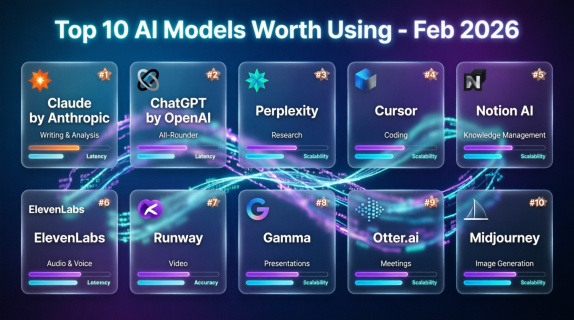
1. Claude (Anthropic) — Best for Writing and Analysis
Best for: Long-form writing, document analysis, research, nuanced reasoning. Free tier: Yes. Pro plan $20/month.
My go-to for writing and thinking work. Claude produces the most natural prose of any model I’ve used — less generic, better calibrated, more consistent. It handles long documents exceptionally well and is notably good at flagging uncertainty rather than making things up.
I use it for documentation, analysis, and working through complex decisions.
Note: It’s more cautious than competitors on certain topics. That’s by design, not a bug.
2. ChatGPT (OpenAI) — Best All-Rounder
Best for: Coding, general productivity, image generation, voice. Free tier: Yes. Plus plan $20/month.
Still the most capable all-purpose AI tool available. GPT-4o is strong across everything — coding, reasoning, image understanding, creative tasks. The free tier has become genuinely useful. The Plus plan unlocks the full model with web browsing and DALL·E image generation.
If you’re only going to use one tool, this is still the default choice.
Note: The interface gets cluttered. Knowing which mode and model to use takes a little learning.
3. Perplexity — Best for Research
Best for: Research questions that need current, cited sources. Free tier: Yes. Pro plan $20/month.
Perplexity searches the web in real time and synthesises the results with direct citations. That’s a fundamentally different experience from asking ChatGPT the same question — you get sources you can actually verify, not just a confident response you have to fact-check separately.
First stop for any research task where accuracy and recency matter.
Note: Not great for creative or generative tasks. But for research it’s excellent.
4. Cursor — Best for Coding
Best for: Writing, editing, and debugging code with AI built directly into the editor. Free tier: Yes, limited. Pro plan $20/month.
Cursor changed how a lot of developers work. Instead of copying code to and from an external AI assistant, the AI is built directly into your editor. It can see your entire codebase, understands context across files, and makes multi-file edits from a natural language instruction.
The difference between Cursor and asking ChatGPT for code is the difference between a colleague working in the same document and emailing someone for snippets.
Note: Built for people who already code. Non-technical users may find the learning curve steep.
5. Notion AI — Best for Knowledge Management
Best for: Summarising notes, drafting within your workspace, organising information. Free tier: Notion is free with limits. AI is an add-on at $10/month per member.
If you’re already a Notion user, this is an easy call. Summarise long pages, generate drafts from bullet points, pull action items from meeting notes, ask questions across your workspace. The integration is what makes it work — you’re not switching context to a separate tool.
Note: Not as capable as standalone Claude or GPT-4o, but the contextual integration compensates.
6. ElevenLabs — Best for Audio and Voice
Best for: Voiceovers, podcasts, audio content creation. Free tier: Yes, limited. Starter plan from $5/month.
The quality gap between ElevenLabs and previous text-to-speech tools is significant. These are convincingly natural voices — real cadence, genuine emotion, not the robotic flatness of earlier generations. Useful for podcasters, video creators, and anyone producing audio content regularly.
Note: AI voice cloning raises real ethical considerations. Use it responsibly.
7. Runway — Best for Video
Best for: AI-assisted video editing, visual effects, short video generation. Free tier: Yes, with watermarks. Standard plan from $15/month.
Runway represents the current state of the art in AI video. It can extend clips, remove backgrounds, apply motion to still images, and generate short video from text prompts. Quality is uneven — some outputs are impressive, others clearly AI-generated — but it’s improving fast.
For marketers and content creators, it offers capabilities that required specialist software two years ago.
Note: Text-to-video is still early. More useful right now as an editing assistant than a creation tool.
8. Gamma — Best for Presentations
Best for: Creating polished slide decks quickly from a prompt or outline. Free tier: Yes. Plus plan $10/month.
Gamma builds professional-looking presentations in minutes. The output is genuinely good — better designed than most people would produce manually — and editing is fast. If you create presentations regularly and find the process tedious, this is one of the clearest AI productivity wins available.
Note: Works best for general business presentations. Highly technical or custom decks still benefit from a more manual approach.
9. Otter.ai — Best for Meetings
Best for: Transcribing meetings, generating summaries, extracting action items. Free tier: Yes, limited. Pro plan $16.99/month.
Otter joins your Zoom, Meet, or Teams calls and produces a live transcript with speaker attribution. After the meeting it generates a summary and highlights action items. For anyone spending significant time in meetings, the value is immediate.
Note: Accuracy isn’t perfect on names, technical terms, and heavy accents. And you need to inform participants that a recording tool is active — legally required in many places, and just basic professional courtesy.
10. Midjourney — Best for Image Generation
Best for: High-quality AI-generated visuals, concepts, illustration. Free tier: No longer available. Basic plan $10/month.
Still the most consistently impressive AI image generator for quality and aesthetic output. The Discord-based interface is unusual but functional, and the community provides a large library of example prompts. For anyone who regularly needs custom imagery, Midjourney reduces dependence on stock photography significantly.
Note: DALL·E via ChatGPT and Adobe Firefly are solid alternatives if you’re already paying for those platforms.
Where to Start
You don’t need all ten. You probably don’t need five.
Start with the tools that address your biggest friction points:
- Writing and thinking → Claude or ChatGPT
- Research → Perplexity
- Coding → Cursor
- Meetings → Otter.ai
- Presentations → Gamma
Pick one. Build the habit. Then expand.
The temptation is to adopt everything at once and use none of them consistently. I’ve seen it happen. Start small and get value first.