🧩 The Four Components of RAG
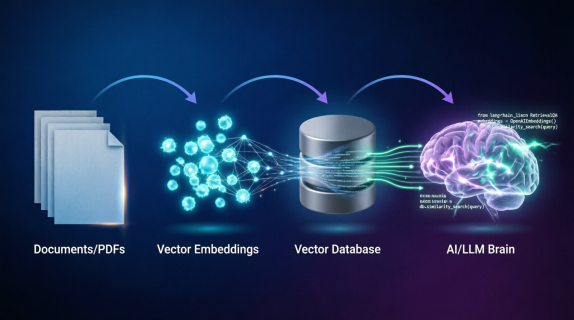
- Document store – Your private files (PDFs, Word docs, Confluence pages, Slack exports).
- Embedding model – Converts text into vectors (arrays of numbers). Examples: OpenAI
text‑embedding‑3‑small,all‑MiniLM‑L6‑v2(free). - Vector database – Stores embeddings and supports similarity search. Options: Chroma (lightweight), Pinecone (cloud), Qdrant (open source).
- LLM – The generator. Takes the user’s query + retrieved chunks + a prompt and returns a grounded answer.
Simple analogy: Imagine you have a huge library (documents). You write a summary card for every paragraph (embedding). When someone asks a question, you find the most relevant cards (retrieval), then hand those full paragraphs to a brilliant librarian (LLM) who reads them and gives a concise answer. That’s RAG.
🛠️ Step‑by‑Step Implementation (Python)
We’ll build a RAG pipeline that can answer questions from a folder of PDFs. We’ll use LlamaIndex (high‑level orchestration), OpenAI for embeddings and LLM, and Chroma as the vector DB. All code is ready to run after pip install.
Step 0: Install dependencies
pip install llama-index chromadb llama-index-llms-openai llama-index-embeddings-openai pypdfStep 1: Load and chunk your documents
from llama_index.core import SimpleDirectoryReader
from llama_index.core.node_parser import SentenceSplitter

# Load all PDFs from a folder
documents = SimpleDirectoryReader("./my_docs").load_data()

# Split into chunks of ~512 tokens with 50 token overlap
parser = SentenceSplitter(chunk_size=512, chunk_overlap=50)
nodes = parser.get_nodes_from_documents(documents)

print(f"Created {len(nodes)} chunks")
Why chunk? LLMs have limited context windows. If you feed a 100‑page document directly, the model will miss details. By chunking, you retrieve only the most relevant paragraphs.
Step 2: Create embeddings and store in a vector database
from llama_index.vector_stores.chroma import ChromaVectorStore
from llama_index.core import StorageContext
import chromadb

# Initialize Chroma client (in‑memory for prototyping)
chroma_client = chromadb.EphemeralClient()
chroma_collection = chroma_client.create_collection("my_knowledge")

# Wrap Chroma collection as a LlamaIndex vector store
vector_store = ChromaVectorStore(chroma_collection=chroma_collection)
storage_context = StorageContext.from_defaults(vector_store=vector_store)

# Create an index that will embed each node and store it
from llama_index.core import VectorStoreIndex
index = VectorStoreIndex(nodes, storage_context=storage_context)
What’s happening? LlamaIndex takes each chunk, sends it to the embedding model (OpenAI by default), gets a vector (e.g., 1536 numbers), and stores that vector in Chroma along with the original text. Later, we can search by vector similarity.
Step 3: Query the index (retrieve + generate)
# Create a query engine
query_engine = index.as_query_engine()

# Ask a question
response = query_engine.query("What is the vacation policy for full‑time employees?")
print(response)
The query engine does this internally:
- Converts your question into an embedding vector using the same embedding model.
- Finds the top‑k most similar chunks in Chroma (by cosine similarity).
- Builds a prompt: “Answer the question based only on the following context: [chunk1] [chunk2] … Question: … Answer:”
- Sends that prompt to the LLM (GPT‑4o by default).
- Returns the LLM’s answer.
Step 4: Advanced – customizing the prompt and retrieval
from llama_index.core import PromptTemplate

custom_prompt = PromptTemplate(
    "You are a helpful HR assistant. Use only the following context to answer the question.\n"
    "Context: {context_str}\n"
    "Question: {query_str}\n"
    "Answer in bullet points:"
)

query_engine.update_prompts({"response_synthesizer:text_qa_template": custom_prompt})
🚀 Production‑Ready Enhancements
The above works for a prototype. For production, add these:
- Hybrid search: Combine vector similarity with keyword (BM25) to catch proper names and exact phrases. Many vector DBs support this natively.
- Re‑ranking: Retrieve 20 chunks, then use a cross‑encoder (e.g.,
cross‑encoder/ms‑marco‑MiniLM‑L‑6‑v2) to re‑rank them by relevance to the query. Keeps only the top 3–5. - Chat history: Instead of re‑embedding the whole conversation, store past turns and retrieve chunks based on the last user query + summarised history.
- Observability: Log which chunks were retrieved and their similarity scores. This helps debug why an answer was wrong.
- Caching: Cache embeddings for common queries to reduce API costs.
📊 Cost Breakdown (Using OpenAI)
For 10,000 documents (each 10 pages → ~500 chunks of 512 tokens):
- Embedding (one‑time): 500 * 10,000 = 5M tokens. Cost with
text‑embedding‑3‑small: ~$0.25 (yes, 25 cents). - Storage: Chroma (free self‑hosted) or Pinecone (free tier up to 100k vectors).
- Per query: ~1,500 input tokens (question + retrieved chunks) + 300 output tokens. Cost ~$0.003 per query. At 10,000 queries/day = $30/day.
Tip: Use a smaller LLM (e.g., GPT‑3.5‑turbo or Llama 3 8B) for RAG – the retrieved context does most of the work, so you don’t need GPT‑4.
Replace embeddings with
BAAI/bge‑base‑en (via llama-index-embeddings-huggingface) and LLM with llama-cpp-python running Llama 3 8B. The pipeline stays exactly the same. This makes your RAG system completely free and private.
🐞 Common Pitfalls and Solutions
- Retrieved chunks are irrelevant: Increase chunk size (1024 tokens) or use a better embedding model (Voyage AI, Cohere). Also try hybrid search.
- LLM still hallucinates: Strengthen your prompt with “ONLY use the context. If the answer is not in the context, say ‘I don’t know’.”
- Slow retrieval: Use an approximate nearest neighbor index (HNSW) – all vector DBs support it. Or reduce the number of chunks per query.
- Outdated documents: Implement a refresh pipeline that re‑embeds documents when they change.
RAG is the single most valuable pattern for enterprise AI. Master it, and you can build a company‑specific Q&A system in an afternoon. Try it with your own HR policies, product documentation, or codebase.