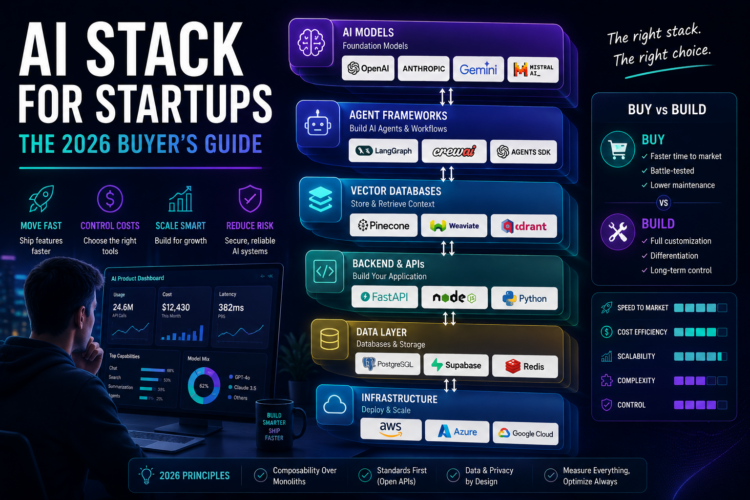
🏗️ The Five Layers of a Modern AI Stack
Every AI‑powered application, from a simple Q&A bot to a complex multi‑agent system, rests on these five layers. Understanding them helps you make independent decisions at each level.
- LLM (Generation) – The Brain
Converts your prompts and context into natural‑language responses. This is the “intelligence” layer. Options range from hosted APIs (OpenAI, Anthropic) to self‑hosted open‑weight models (Llama, Mistral). - Embeddings (Text → Vectors) – The Index
Turns text into dense numerical vectors that capture semantic meaning. These vectors are used for search, clustering, and retrieval. High‑quality embeddings are the foundation of good RAG. - Vector Database – The Memory
Stores your embeddings and enables blazing‑fast similarity searches at scale. You query it to find the most relevant pieces of your private data for a given user question. - Orchestration – The Conductor
Glues everything together. It manages the flow: take a user query, call the embedding model, search the vector DB, construct the prompt, call the LLM, and return the result. It also handles memory, tool calling, and multi‑step reasoning (agents). - Observability – The Dashboard
Logs, traces, metrics, and evaluations. When your AI gives a wrong answer, you need to see exactly why – which chunks were retrieved, what the prompt was, and the model’s raw output. This is non‑negotiable for production.
🔍 Layer‑by‑Layer Deep Dive
1. LLM APIs – Which Model for Which Stage?
The choice of LLM is the most visible, but also the easiest to swap later if you design correctly. Here’s a stage‑by‑stage recommendation based on real startup trajectories.
| Stage | Recommendation | Why | Cost (per 1M tokens) |
|---|---|---|---|
| Prototype (days 0‑30) | GPT‑4o mini | Very cheap ($0.15/1M input), fast, and surprisingly capable for testing product‑market fit. Don’t spend big until you validate. | $0.15 in / $0.60 out |
| Beta (months 1‑6) | GPT‑4o or Claude 3.5 Sonnet | Higher quality for customer demos. Volume is still low, so the higher cost per token is acceptable. | $5/$15 (GPT‑4o) |
| Production at scale (100k+ requests/day) | Self‑hosted Llama 3 8B or 70B | Cost drops 10‑50x. Full data privacy. You control the version. | ~$0.01/1M (self‑hosted) |
Many startups successfully launch with GPT‑4o mini and never need to upgrade. Only move to a larger model if you consistently see quality gaps in user feedback.
2. Embeddings – The Silent Driver of Quality
I cannot overstate this: your retrieval quality depends almost entirely on your embedding model. Bad embeddings mean irrelevant chunks get fed to the LLM, which produces bad answers – no matter how good your LLM is.
- Best in class (performance): Voyage AI (fine‑tuned for RAG) or Cohere v3. Cost is higher (~$0.10/1M tokens), but they consistently outperform on retrieval benchmarks.
- Best for most startups: OpenAI
text‑embedding‑3‑small. At $0.02/1M tokens, it’s almost free for prototyping and works well for general‑purpose documents. - Best for privacy / cost reduction:
BAAI/bge‑large‑en(open source). You can run it on a CPU for batch jobs, but for real‑time, you’ll need a small GPU.
Pro tip: Start with OpenAI embeddings. They are trivial to use. When you reach millions of documents, you can switch to a self‑hosted model fine‑tuned on your specific domain (e.g., legal contracts, medical notes) without changing the rest of your stack.
3. Vector Databases – The Right Choice for Each Scale
Vector databases are surprisingly cheap and easy to start with. Don’t over‑engineer this layer.
- 0 – 100k vectors (prototype): Chroma (in‑memory, zero ops). Perfect for local development and small internal tools.
- 100k – 10M vectors (early growth): Qdrant self‑hosted on a single VM (2 vCPU, 8GB RAM) – roughly $25‑$50/month on AWS or DigitalOcean.
- 10M+ vectors / high QPS: Pinecone serverless (managed, scales automatically, ~$500‑$2,000/month depending on usage) or Milvus (open source, very powerful but requires more complex ops).
Most B2B startups never exceed 1M vectors. A $20 VM running Qdrant is more than enough. Resist the urge to use Pinecone until you have actual production traffic.
4. Orchestration – LangChain vs. LlamaIndex vs. Raw Python
Orchestration frameworks are hotly debated. Here is my unbiased, practical take based on building with both for over 2 years.
- LlamaIndex – “RAG first”. It has amazing data connectors (Notion, Slack, Google Drive, 100+ others) and built‑in retrieval strategies (hybrid search, re‑ranking). The learning curve is gentler. Use this if 80% of your use case is Q&A over documents.
- LangChain – “Agents first”. It’s more flexible and supports complex chains, tool calling (APIs, calculators, browsers), and memory. It has a steeper learning curve and is more verbose. Use this if you need multi‑step reasoning or your AI needs to call external systems.
- Raw Python – For very simple RAG (embed + search + LLM), you can write a clean 30‑line function with just the OpenAI and Chroma SDKs. No framework overhead. This is often the best choice for microservices with a single, well‑defined task.
5. Observability – You Will Regret Skipping This
When your AI gives a confidently wrong answer, you need a forensic audit trail. Observability tools show you:
- Which chunks were retrieved and their similarity scores.
- The exact prompt template and the final prompt sent to the LLM.
- The LLM’s raw response, token counts, and cost.
- Latency breakdown (embedding time, search time, generation time).
Options: LangSmith (paid, excellent UI, deep integration with LangChain/LlamaIndex). Helicone (open‑source, acts as a proxy, works with any OpenAI‑compatible API – free tier is generous). Arize Phoenix (open source, self‑hosted).
I recommend Helicone for startups – it takes 2 minutes to set up and gives you instant visibility without any code changes.
💰 Sample Startup Stack Costs (Monthly)
Assumptions: 100,000 queries/month, average 2K input tokens + 500 output tokens, 1M vectors stored. This is a typical early‑stage B2B SaaS with decent usage.
| Component | Option | Cost |
|---|---|---|
| LLM | GPT‑4o mini (API) | $15 (input) + $60 (output) = $75 |
| LLM (alternative) | Self‑hosted Llama 3 8B (1x A10G on AWS) | $720 (reserved) – but no per‑query cost, good if you grow to 1M+ queries |
| Embeddings | OpenAI text‑embedding‑3‑small | $0.02 * (200M input) = $4 |
| Vector DB | Qdrant self‑hosted (2 vCPU, 8GB RAM) | $25 (cloud VM) |
| Orchestration | LlamaIndex (open source) | $0 |
| Observability | Helicone (free tier) | $0 |
| Total (API LLM) | $104 / month | |
| Total (self‑hosted LLM) | $749 / month – but cheaper than API beyond ~500k queries/month |
Verdict: For 90% of startups under 1M queries/month, the API‑first stack is cheaper, simpler, and faster to iterate. Self‑hosting only makes financial sense at very high volume or when data privacy regulations (HIPAA, GDPR‑heavy) force you to keep everything on‑prem.
Use
liteLLM – a tiny library that provides the exact same interface for OpenAI, Anthropic, Cohere, Groq, and any self‑hosted endpoint (via OpenAI‑compatible APIs). Your code stays identical.from litellm import completion
# Today: use GPT‑4o
response = completion(model="gpt-4o", messages=[{"role":"user","content":"Hi"}])
# Tomorrow: switch to self‑hosted Llama 3 without changing a single line of business logic
response = completion(model="openai/meta-llama/Llama-3-8b", api_base="http://localhost:8000/v1")
This means you can start with the best proprietary model, and when open‑source catches up (or you hit scale), you can migrate in hours – not months.
📋 Recommended Stack for a New AI Startup (Mid‑2026)
- LLM: Start with GPT‑4o mini. It’s cheap, fast, and surprisingly smart. If you need top‑tier code or creative writing, use Claude 3.5 Sonnet for those specific tasks via the same abstraction.
- Embeddings: OpenAI
text‑embedding‑3‑small– the price/performance sweet spot. - Vector DB: Qdrant self‑hosted on a $25 VM. It’s easy, well‑documented, and handles 1M+ vectors with ease.
- Orchestration: LlamaIndex for RAG. Add LangChain only when you need agents with tools.
- Observability: Helicone – set it up as a proxy on day one. Free and gives you instant traces.
- Deployment: FastAPI for the backend, Vercel or Railway for hosting the API, and Streamlit for internal demos.
This stack allows you to ship an AI‑powered feature in days, not months. Every component is modular – you can replace any single piece as your needs evolve.
🧠 Final Strategic Advice
The most common mistake I see is startups over‑investing in custom infrastructure before they have even validated their product. The AI landscape changes every 3 months. Today’s best vector database might be obsolete tomorrow. The model that is state‑of‑the‑art today will be commoditized in 12 months.
Your job is to build a great product, not a great AI platform. Use high‑level abstractions, lean on managed services, and don’t optimize for costs you don’t have yet. When you succeed, you can always hire a team to rebuild the infrastructure. Until then, your stack should be the least interesting part of your startup.